-1.png)
The side menu
The menu is always on the left. It starts "collapsed", showing only icons. Click the small arrow (›) next to the logo to expand it and see each item's name.
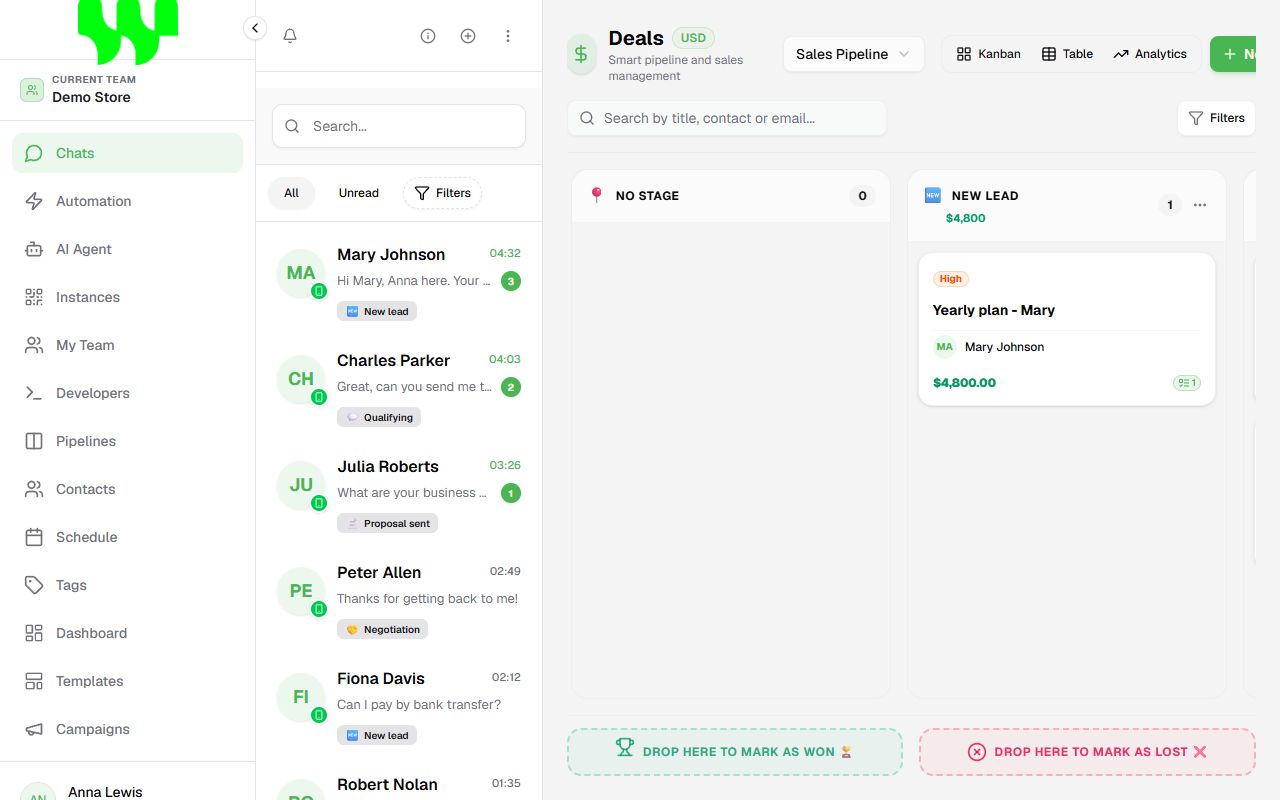
| Icon / item | What is there |
|---|---|
| Chats | WhatsApp inbox and the sales pipeline. This is the main screen. Open |
| Automation | Service bots built with blocks. Open |
| AI Agent | Virtual assistants powered by Artificial Intelligence. Open |
| Instances | Connected WhatsApp numbers. Open |
| My Team | Invite people, permissions and currency. Open |
| Developers | API keys to integrate with other systems. Open |
| Pipelines | Create and manage pipelines (Kanban boards). Open |
| Contacts | The CRM with every customer's record. Open |
| Schedule | Calendar of appointments and tasks. Open |
| Tags | Labels to classify customers (VIP, Hot…). Open |
| Dashboard | Sales and service reports and indicators. Open |
| Templates | Message templates approved by Meta (Official API). Open |
| Campaigns | Bulk messaging. Open |
Can't find an item?
The menu only shows what you are allowed to use. If something is missing, ask the team owner to grant the permission. See Team and permissions.
Bottom of the menu
- Your avatar (initials): opens the menu with Settings and Sign out.
- Language: with the menu expanded, the language selector appears.
- Sun / Moon: switches between light and dark theme.
Top of the menu: current team
Right below the logo is the current team. If you belong to more than one team, click there to switch. Everything on screen (chats, contacts, bots) belongs to the selected team.
The Chats screen
The main screen has two parts:
- Left: the chat list, with search, All / Unread tabs and the Filters button.
- Right: the sales pipeline (Kanban) of the selected pipeline. When you open a chat, this area becomes the conversation.
Buttons at the top of the chat list:
| Button | Function |
|---|---|
| 🔔 Bell | Desktop notifications and alert sound for new messages. |
| ⓘ Information | Opens the welcome tour again. |
| ⊕ Plus | Starts a new chat or imports chats from WhatsApp. |
| ⋮ Three dots | Select Chats: selection mode to delete several chats at once. |
Turn on notifications
Click the bell and Allow Notifications to be alerted to new messages even with the browser minimized. In the same menu you choose the alert sound.
Notices you may see
- Yellow "Grace Period" bar: there was a payment problem, but you still have some time to fix it.
- Red "Pending Payment" / restricted bar: the payment was not settled and some features are blocked. See Plans and billing.
- "New Update": the system has new features. Click to see what changed.